
Stock management software
Stock management software in Morocco: goods in, goods out, stocktakes
Gestio is stock management software built in Morocco: every sale takes the quantity out, every goods receipt brings it into the right depot, a stocktake corrects the difference and a reorder alert warns you before you run out — by the case or by the unit, on Android, iPhone and the web, with a 7-day free trial.

What stock kept in your head costs
Four things stock management software has to get right
For a Moroccan shop, stock management software has to get four things right: goods in and out without double entry, a stocktake that states the difference instead of guessing it, an alert before you run out, and the same product sold by the case and by the unit without breaking the quantity. Here is what Gestio does with each.
Goods in and out, without double entry
A sale or a delivery takes the quantity out, a goods receipt brings it in, a return puts it back in the right place. You can find the operation that moved each product, instead of patching a spreadsheet kept on the side.
A stocktake without recounting everything
The stocktake compares expected stock with the real count and shows the difference, product by product. It is the only place where a quantity is corrected by hand — everywhere else, the quantity is the result of the movements.

Stockouts you notice too late
You set the level at which you need to reorder. Gestio knows the quantity left after each sale, compares it with that level and shows the list of products to restock.

Cases and units
The same product carries a case price and a unit price. Stock stays counted in units: a case of 12 sold takes out 12, not 1.
For teams
Your team does the work, you stay in control
Every employee has their own account. You see what they do, what they collect and how close they are to their targets — from your phone or your computer.
Stock is never held by one person: the seller takes goods out at the counter, the stock manager receives them at the depot, the owner looks at the differences. Each account has its role — seller, cashier, stock manager, accountant — and the activity log keeps who corrected a quantity and when.

Roles and permissions
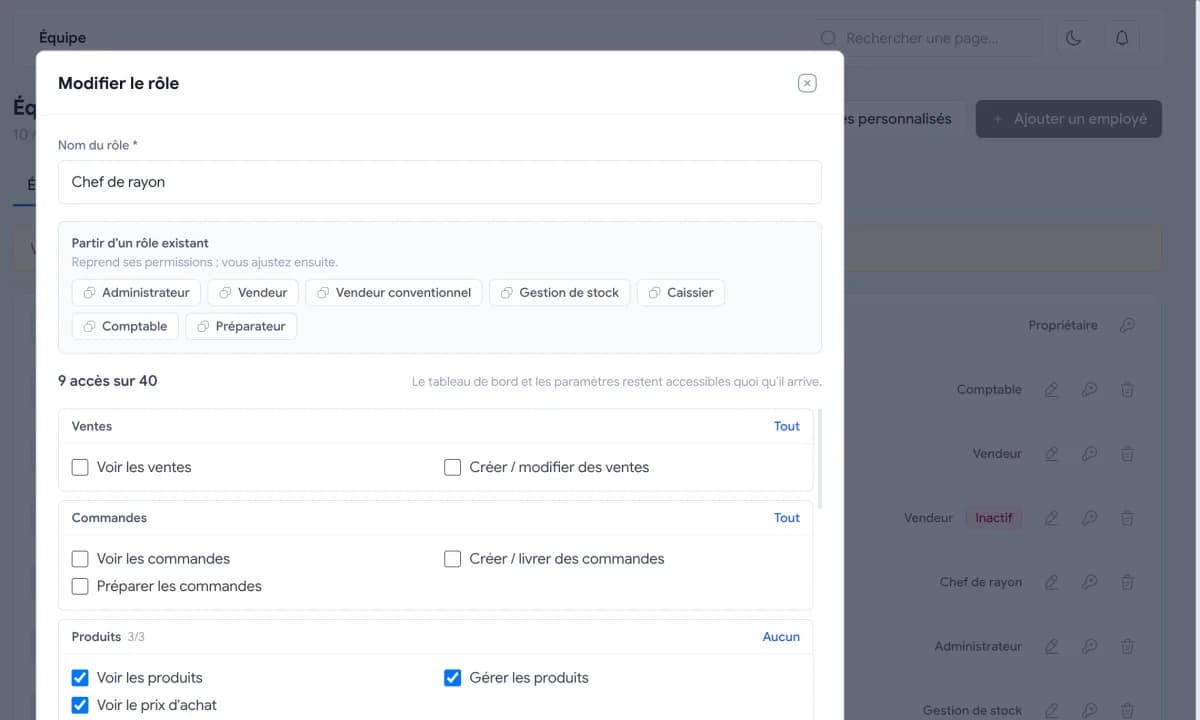
Salesperson, cashier, storekeeper, accountant, or a custom role. Each person sees only what the job needs: a storekeeper sees neither selling prices nor margins.

Activity log per employee
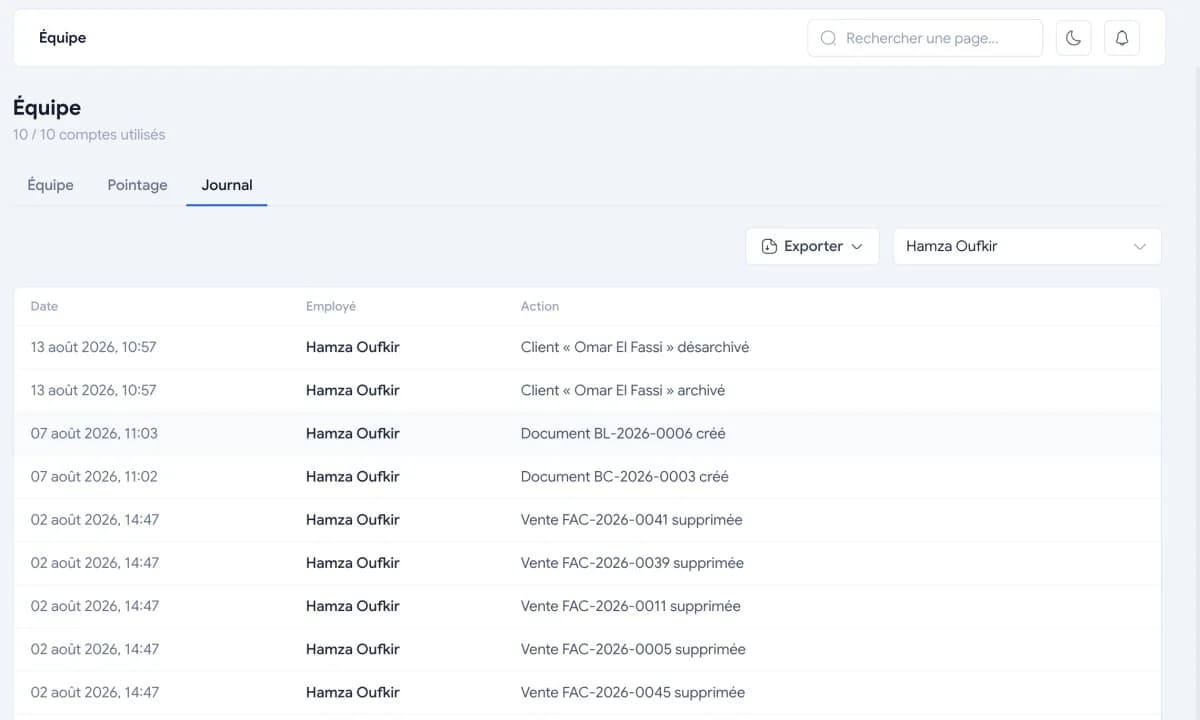
Sale created, product edited, payment recorded: every action is kept with who did it and when. Only the manager can see the log.
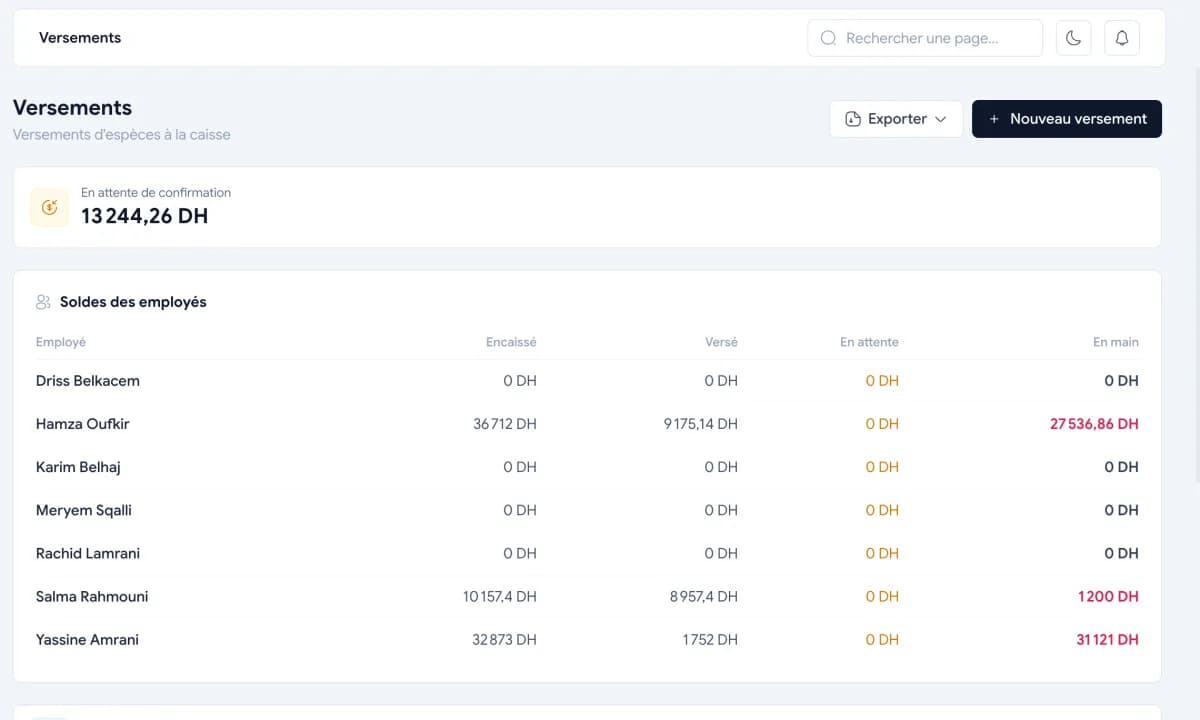

Cash hand-ins and balance per employee
What each salesperson collected and what they handed in are both recorded. Their balance tells you what they still owe the till.
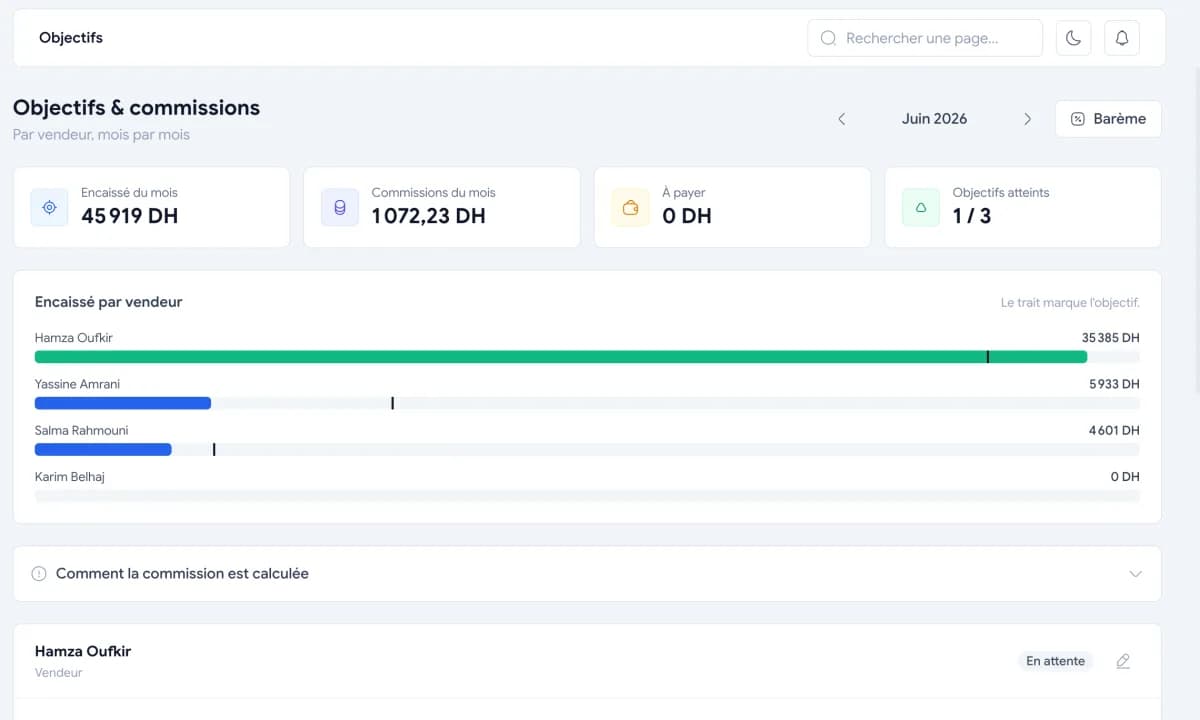

Targets per salesperson
Set a target for each salesperson and follow their progress, without waiting for the end of the month to find out.
Capabilities
What Gestio handles on stock, and how
Gestio tracks stock from the shop's real operations: the sale and the delivery take goods out, the goods receipt brings them in, the stocktake settles the difference. Here is each capability, how it works, and what to know before relying on it.
| Capability | How it works in Gestio | Worth knowing |
|---|---|---|
| Goods in and out | Sales, deliveries, goods receipts and returns update the quantity at the moment of the operation. | Every movement keeps its reason: you can see what moved a product. |
| Stocktake | The real count is compared with expected stock, and the difference is identified then corrected. | It is the only place where a quantity is corrected by hand. |
| Low-stock alerts | You set a threshold per product; the remaining quantity is compared with it after each sale. | The list of products to restock shows on the phone as well as on the computer. |
| Cases and units | The same product sells by the piece or by the case, with a price for each. | Stock is counted in units; the pack size is only a multiplier. |
| Several depots | Quantity is tracked per depot, with transfers from one depot to another. | Damaged or expired products are isolated in a separate depot so they are not sold again. |
| Purchases and receipts | Supplier purchase orders, goods receipts and supplier returns; stock enters on receipt. | The supplier balance updates at the same time as the goods. |
| Barcodes and mobile | The seller scans the product and takes payment from the Android app, with a Bluetooth ticket. | A connection is required: Gestio does not work offline. |
How Gestio keeps stock up to date, without a spreadsheet on the side
Gestio keeps stock up to date by following the shop's real operations: every sale or delivery takes the quantity out, every goods receipt brings it into the depot that actually received it, and the stocktake compares expected stock with the real count. The quantity on screen is therefore not typed in, it is the result of the recorded movements — which is why it stays right between two counts.
The same figure is read on the seller's phone at the counter and on the office computer, at the same moment. If your stock still lives in a binder, start with our stock management template for Excel: it lays out the same columns as the app, which makes the move much simpler. The screens are detailed on the features page.
Low-stock alerts: at what level should you reorder?
The level at which you need to reorder — the reorder point — is worked out from two numbers you already have: what the product sells per day, and the supplier's real lead time, plus a safety margin. An example to make it concrete: six units a day with a supplier who takes four days means twenty-four units consumed while you wait; ordering at twenty-four means hitting zero on the very day of delivery.
Setting these levels by hand works perfectly well for twenty or thirty products. What does not work by hand is watching them: you would have to re-read the whole list every evening to spot the three lines that slipped below. Gestio knows the quantity left after each sale, compares it with the level you set and shows the list to order, on the phone as well as on the computer. The calculation itself is detailed in our guide to the reorder point.
Cases and units: why a case of 12 must take out 12
In Gestio, stock is always counted in units and the pack size is only a multiplier: a product carries a case price and a unit price, and a case of 12 sold takes 12 out of stock, not 1. That is what prevents the wrong end-of-month stock, where the software announces cases while the shelf holds pieces.
This case-and-unit path is also what the vendors we compared do not document: multi-warehouse, batches and valuation are described, this particular journey is not — see our vendor-by-vendor comparisons. The concrete case of a hardware store is told in case and unit: without breaking your stock, and the same mechanics serve wholesalers who sell the same product at both prices.
Several depots: knowing where the goods are, not just how many
Gestio tracks quantity product by product and depot by depot, which answers the useful question once there is a shop and a stockroom: not « how many do I have » but « where is it ». Goods transfer from one depot to another, and damaged or expired products are isolated in a separate depot so they are not sold again by mistake.
Above 15 people, or with several depots to run, the Distribution offer applies and is quoted on request. The wholesalers and distributors pages describe that daily work, and location before quantity explains how to organise a depot before putting software in it.
What Gestio does not do on stock
Gestio does not work offline: a connection is required, at the counter and in the depot. It documents no stock valuation method — neither weighted average cost nor FIFO: a stock-value counter exists on screen, but not the calculation method an accountant may require. Batches, serial numbers, FEFO and warehouse bin locations are not its ground either, and it is not a full accounting suite: you get margin and profit, not ledger entries.
These limits are selection criteria, not details: if your accountant requires a specific valuation, or if the depot has to work without the internet, settle it before deciding. We compare Moroccan and international vendors on those points in our review of stock management software in Morocco.
Pricing
Stock is included in both plans
Stock is not a paid add-on: it is part of Solo as well as Entreprise, up to 15 people. A 7-day free trial, full access.
Solo
One shop, one account
1 490 DHper year
Business
3 accounts included, then 500 DH per account per year
3 900 DHper year
Payment by bank transfer or cash deposit. Activation on WhatsApp.
See pricingFAQ
Questions about stock management
The questions that come up before choosing stock software in Morocco: how quantities update, what happens between the case and the unit, how many depots, whether it works without the internet, valuation, and the price.
How does Gestio keep stock up to date?
Through the operations: a sale or a delivery takes the quantity out, a goods receipt brings it into the depot concerned, a return puts it back. The stocktake then compares expected stock with the real count so the difference can be identified and corrected.
Can I be alerted before I run out?
Yes. You set the alert threshold for each product; Gestio compares the remaining quantity with that threshold after each sale and shows the list of products to restock, on the phone as well as on the computer.
I sell by the case and by the unit. Does stock follow?
Yes, and it is designed for it from the start. A product can have a case price and a unit price; stock is always counted in units, the case being only a multiplier. A case of 12 sold takes 12 out of stock.
Does Gestio handle several depots?
Yes. You can see a product's quantity in each depot, transfer goods from one location to another and keep damaged or expired products in a separate depot so they are not put back on sale.
Does Gestio work without the internet?
No. A connection is required, on the phone as well as on the computer: the data sits on a server, which lets the seller and the manager see the same figures at the same moment. If your depot has to work offline, that is a point to settle before choosing.
Does Gestio value my stock using weighted average cost or FIFO?
A stock-value counter exists in the app, but no valuation method is documented, neither weighted average cost nor FIFO. If your accountant requires one, ask before deciding: some tools on the market put it forward.
How much does Gestio cost to manage my stock?
Stock is included in both plans: Solo 1 490 DH a year for a shopkeeper working alone, Entreprise 3 900 DH a year with 3 accounts. A 7-day free trial, then payment by bank transfer or deposit, with no monthly subscription.
See your stock in Gestio
A demo with your own products: your pack sizes, your depots and your alert thresholds.
7-day free trial